Spatial Manager™ for BricsCAD
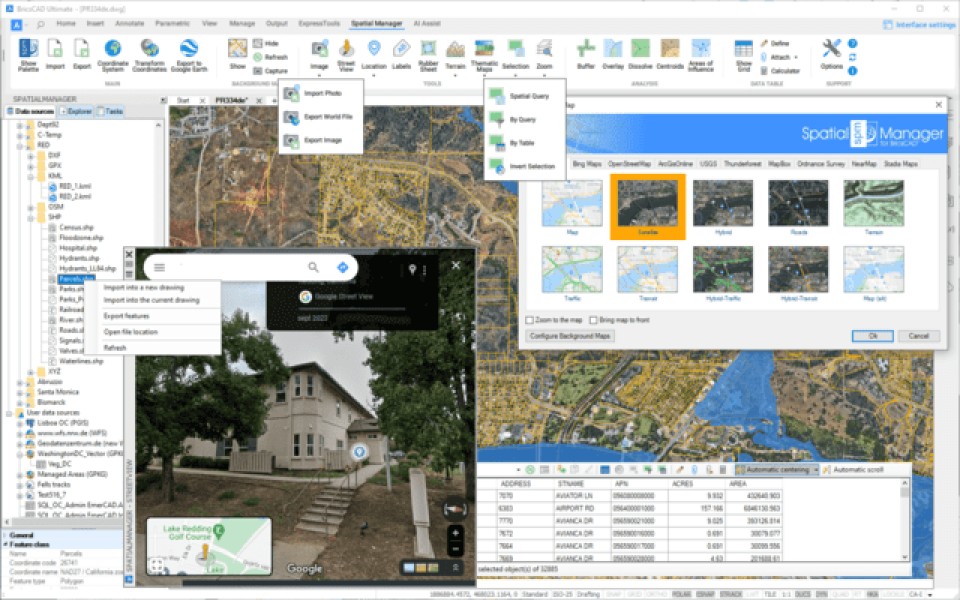
Spatial Manager™ for BricsCAD is a powerful BricsCAD plug-in designed for BricsCAD users who need to import, export, transform and manage spatial data in a simple, fast and inexpensive way, which includes many functionalities not seen so far in BricsCAD
- Importing and exporting spatial data in BricsCAD | Coordinate management
- Background maps | Publishing in Google Earth | Thematic maps
- Data management | Spatial analysis | Drawing tools | Image tools
- Geometry tools | Location tools | Integration with Google Street View
- Terrain Assistant | Map Books | Perpetual License | Multilingual
Description
Spatial Manager™ for BricsCAD is a powerful BricsCAD plug-in designed for BricsCAD users who need to import, export, transform, and manage spatial data in a simple, fast, and cost-effective way, including many features not previously seen in BricsCAD. It is a lightweight application that runs within BricsCAD and allows the user to import and export geospatial data between BricsCAD drawings and geospatial files, servers, or data stores, display background maps, manage alphanumeric data and data tables, create terrain models and contour lines, search for locations, transform coordinate systems, and many more geospatial features. Key features • Import spatial data into BricsCAD*: Import spatial data into new or existing BricsCAD drawings as BricsCAD objects and Extended Entity Data (EED). • Export spatial data from BricsCAD* (Enhanced in V10): Export objects from the drawing to spatial files or databases and save your Extended Entity Data (EED) as alphanumeric data tables • Coordinate management: Calculate coordinate transformations of objects during import and export processes • Background Maps (Enhanced in V10): Choose from a wide range of dynamic Background Maps from providers such as Google Maps, OpenStreetMap, Bing, MapBox, Ordnance Survey, etc., or configure your own maps • Publishing to Google Earth: Export all or part of the objects in the visible Layers of the drawing and their data to a KML or KMZ file • Thematic maps (Enhanced in V10): Visualize objects by coloring them based on their field values • Data management (Enhanced in V10): Manage alphanumeric data linked to objects, design and edit the structure to be used to store the data • Spatial Analysis: Perform spatial analysis operations on objects in the drawing, generating new objects from those analyses • Drawing Tools: Drawing tools make your life easier by allowing you to perform actions directly on the drawing • Image Tools: Spatial Manager's image tools allow you to efficiently manage your work with raster images • Geometry tools (New in V10): A set of geometry tools designed to edit, transform, and optimize a wide variety of vector elements, including polylines, polygons, and other geometries • Location tools: Location and geocoding tools help add reference elements and enhanced data to existing objects • Google Street View integration (Enhanced in V10): Navigate dynamic Google Street View images in any drawing or georeferenced map • Terrain assistant: Create Terrains and other related objects (3D Points, Contour Lines, etc.) from 3D data or Elevation services • Map books (New in V10): Automatically create atlas-style layouts. Ideal for large areas, this feature helps you organize and print multi-page maps with consistent views, titles, and layouts • Perpetual license: Pay once, no recurring fees • Multilingual: Available in English, German, Spanish, French, and Portuguese * Available data providers: Spatial files • Esri Shape file - (SHP) • Google Earth file - (KML, KMZ) • OpenStreetMap file - (OSM, PBF, OSC) (1) • LiDAR file - (LAS, LAZ) • GPS exchange file - (GPX) • Esri ASCII Grid file - (ASC, ASCII) (1) • ASCII text file - (ASC, CSV, NEZ, TXT, XYZ, UPT) • SQLite file - (SQLITE, DB) • GeoPackage file - (GPKG) • GML file - (GML, GZ, XML) • Raster image file - (TIF, PNG, JPG, JPEG, TIFF) (1) • Autodesk SDF file - (SDF) (3) • MicroStation v.7 file - (DGN) (2) • AutoCAD DXF file - (DXF) (2) • Esri ArcInfo export file (ASCII) - (E00) (1) (2) • MapInfo file - (TAB) (2) • MapInfo interchange format file - (MIF/MID) (2) • GeoJSON file - (GEO.JSON) Spatial raster files • Raster image file - (TIF, PNG, JPG, JPEG, TIFF)(1) • Geo-reference sources - (World files, Google Earth .GEPRINT files, etc.) • Variable resolution raster image file - (Cloud Optimized GeoTIFF/COG TIFF) (1) (4) Spatial data servers and geodatabases • Esri Geodatabase file (1) • PostGIS database • Microsoft SQL Server Spatial database • MySQL database (1) (3) Image map servers • WMS Web Map Services (4) • WMTS Web Map Tile Services (4) • XYZ/TMS Tile Map Services (4) Other spatial data sources • Open Database Connectivity ODBC (1) • WFS data store (1) • WFS data store (FDO) (1) (3) (6) • WFS data store (OGR) (1) (2) (5) (6) (1) Read-only (2) OGR data source (3) FDO data provider (4) Background Map Technology (5) The OGR variant for WFS data stores may not be found in the list of Data Providers in some circumstances (some versions of AutoCAD Map and others). Please use the native or FDO variants for this data provider (6) OBSOLETE - Whenever possible, use the native WFS data provider Note: Some data providers are only valid in certain editions of the application


BricsCAD Pro V13 - V26
Windows
943 21 90 03